Field service software
Every job, handled.
Ask it to book the job and it books the job. It won't let a visit close half-finished. The native field app puts the job in your tech's hand.
- 14 days free
- No credit card
- Cancel anytime
- HVAC
- Plumbing
- Electrical
- Appliance repair
- Landscaping
- Garage doors
- Pest control
- Pools & spas
- Roofing
- Locksmith
- Cleaning
- Every trade in between
Built in
Tell it what you need. It does the clicking.
Ask in plain English and it books the job, prices the quote, pulls up the history and tells you who still owes you. Type it on any plan; talk to it out loud from Professional up.
Book Maria Vasquez for a water heater swap Thursday at 9.
Done — JOB-0027, Thursday 9:00 AM at 114 Locust Ave. Devon's the only one open that morning, so he's on it.
Who still owes me from last month?
Four invoices, $3,305 outstanding. The oldest one is 41 days.
It isn't a search box that hands you a help article. It does the work in your account — the same job, quote or clock-in you'd have made yourself, on your own customers and your own prices.
- Books jobs
- Builds quotes
- Finds any customer
- Checks who's free
- Clocks time
- Chases overdue money
On every plan. Talking to it out loud starts on Professional.
In the field
The office, in your tech's pocket.
Everything they need to run the job, and everything you need back from it — without a phone call in the middle of it.
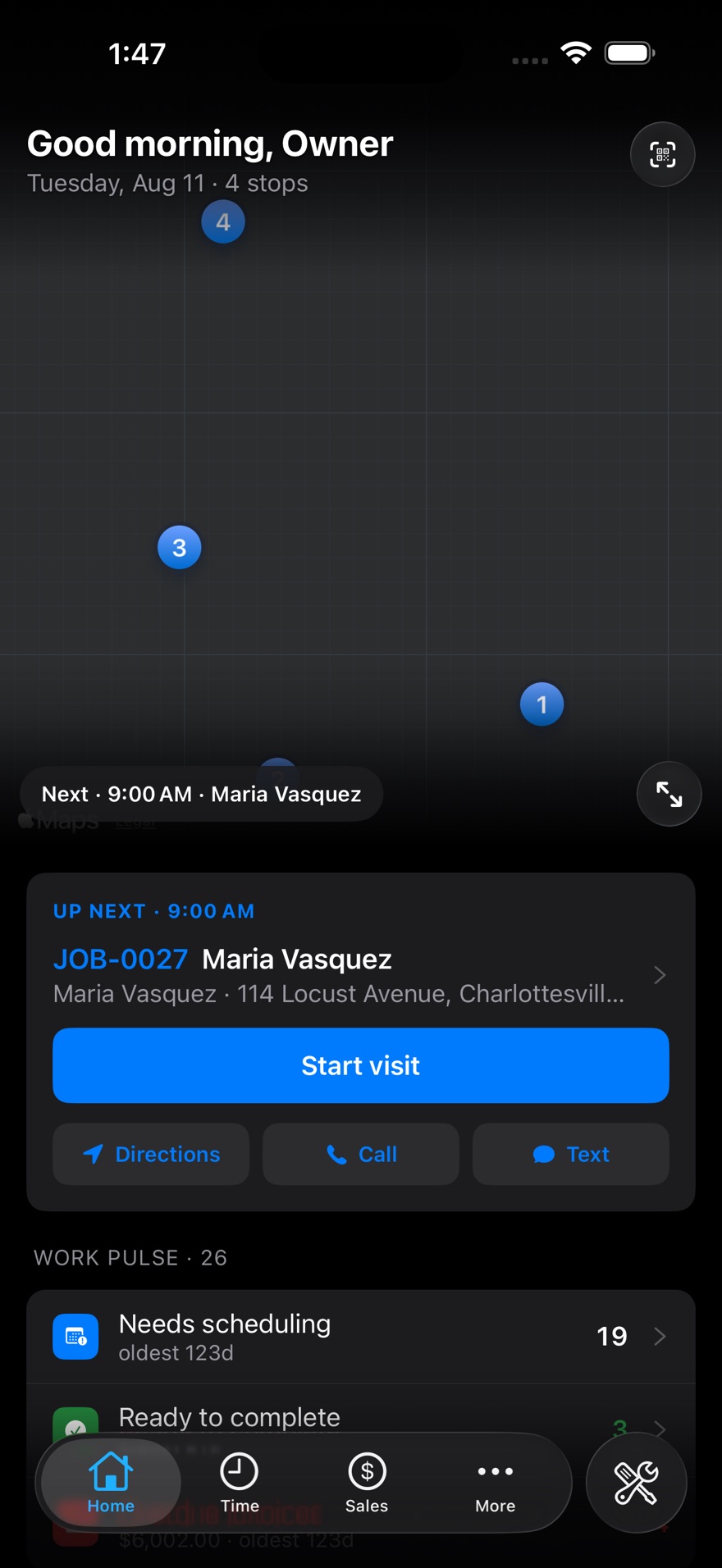
The morning
Today's stops on a map, who's next, and one tap to drive, call, or start the clock.
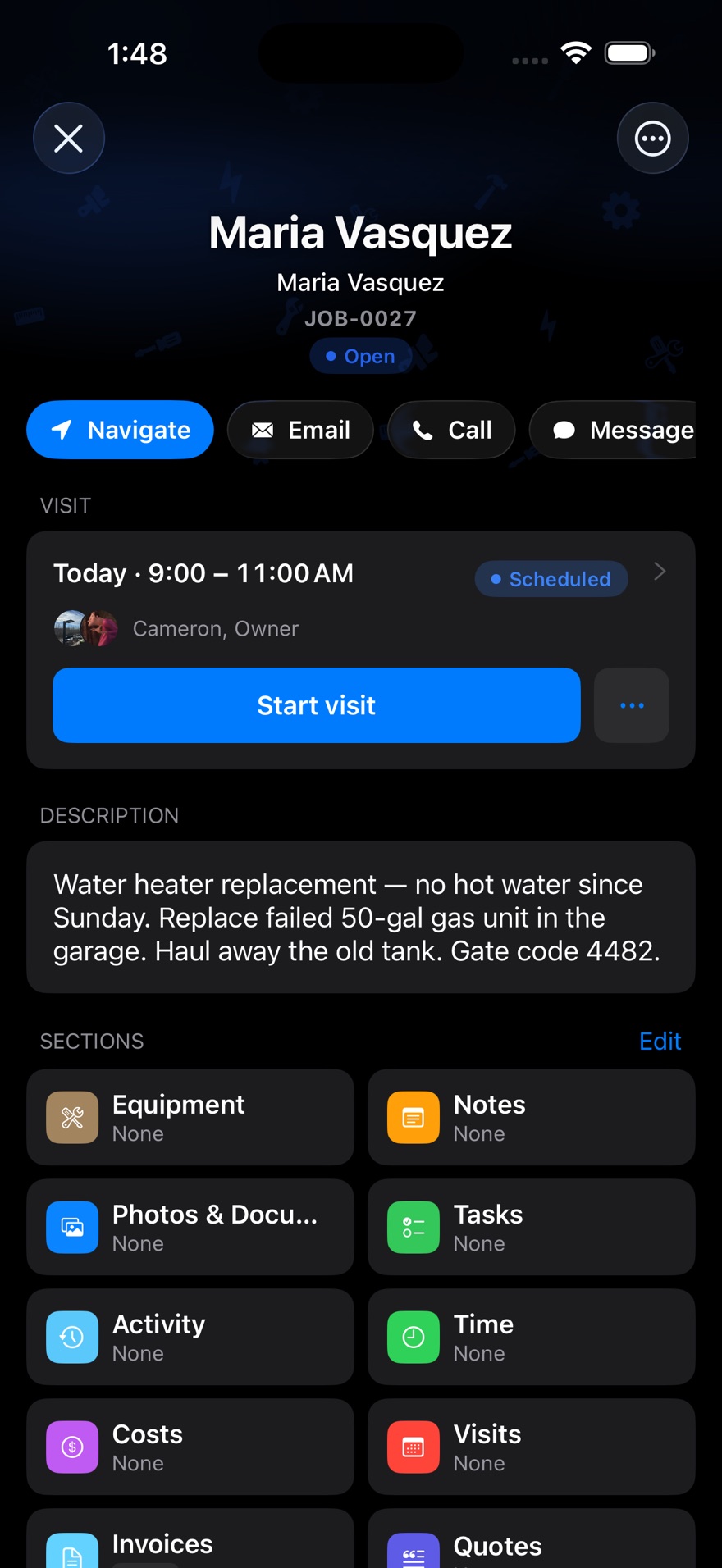
The job
What to do, the gate code, photos, equipment history and the running clock — one screen.
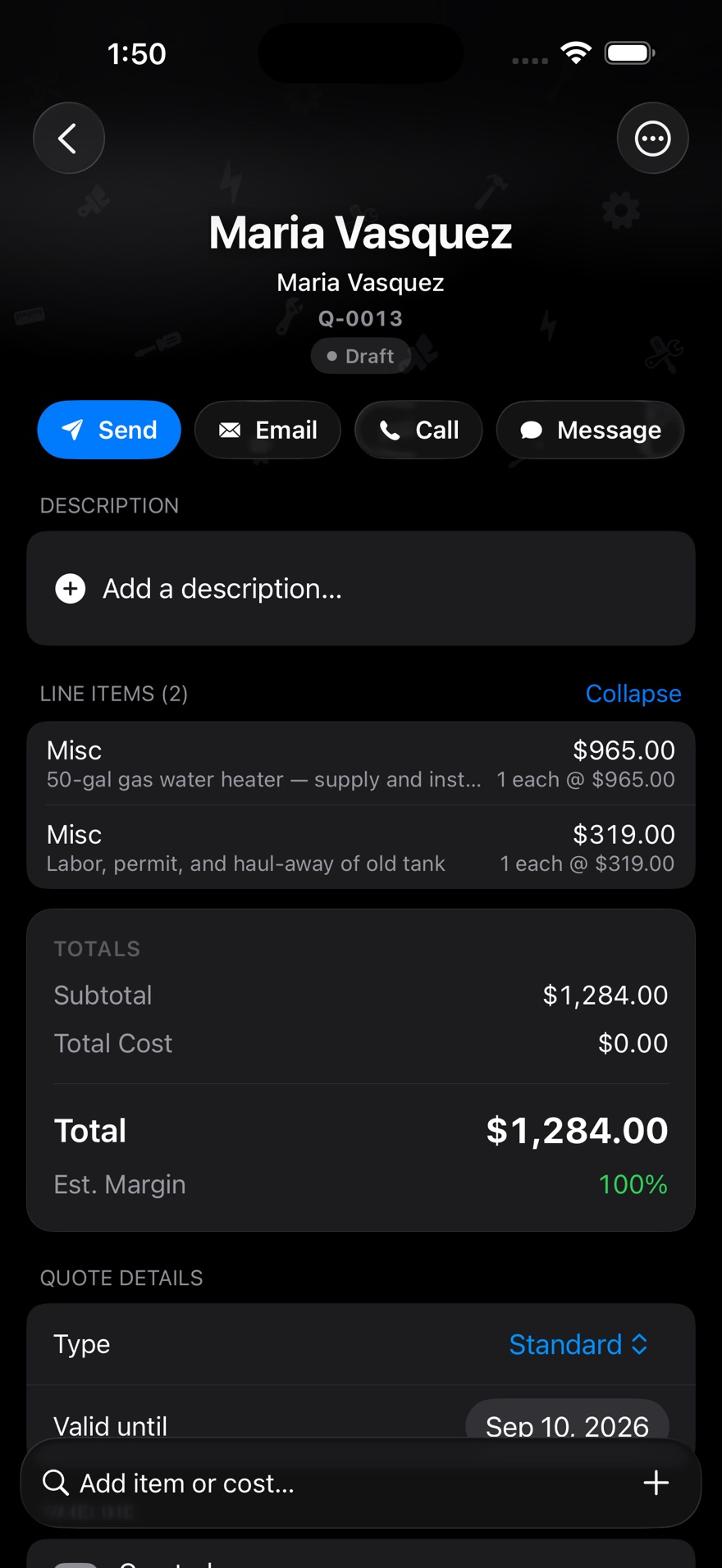
The quote
Price it at the truck, take a signature, and send it before you pull out of the driveway.
How it works
From the first call to the paid invoice.
01
Book it
Take the call, find the customer, drop the job on the calendar. Their history, equipment and past prices are already there.
02
Send the crew
Assign a tech and the job lands on their phone with the address, the checklist and the gate code. The customer gets a text when they're on the way.
03
Get paid
Sign off on site, tap a card on the phone, and the invoice is closed before the truck leaves.
What's different
The parts other software leaves to you.
Nothing closes half-finished
You decide what a visit needs before a tech can call it done — hours in, a service note written, the costs checked, the customer's signature. Miss one and it won't close.
Set it once for the whole company, then bend the rules for the job that needs it — make a step a reminder instead of a stop sign, or let a manager wave it through with a reason on the record.
Your crew, one place
Channels for the office, the shop and the field, plus direct messages — with the job, quote or invoice linked right in the message.
Anyone got a 50-gal in their truck?
Two on mine. Sending you Job #1042
Spotty signal, honest limits
Select field actions can wait on the phone and send later. Full cold-start job access, photos and checklists still need a connection today — broader offline support is in development.
The machine remembers
Scan the nameplate once. Model, serial, warranty and every visit since stay with the unit — not buried in last year's job notes.
Customer texts
Back and forth in the same thread, so nobody hands out a personal cell number.
Devon is on the way — about 15 minutes out.
Perfect. Gate code is 4482.
Got it. See you shortly.
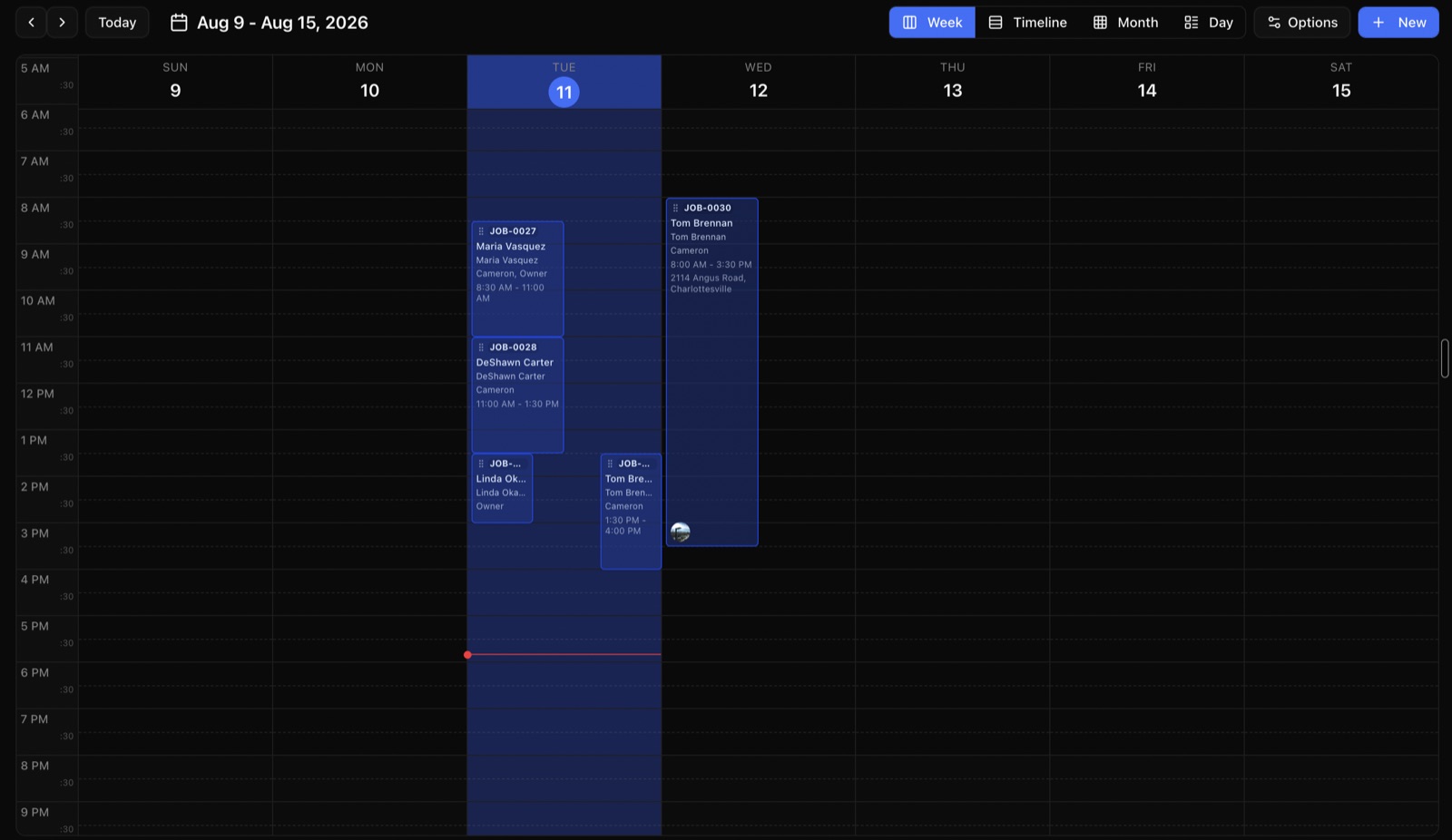
The calendar
Drag a job to a different day or a different hour. Double-books get flagged before you save.
Tap to Pay
Take a card on the phone you already carry. No dongle, no card reader to lose.
AMOUNT DUE
$1,284.00
Paid · Tap to Pay on iPhone
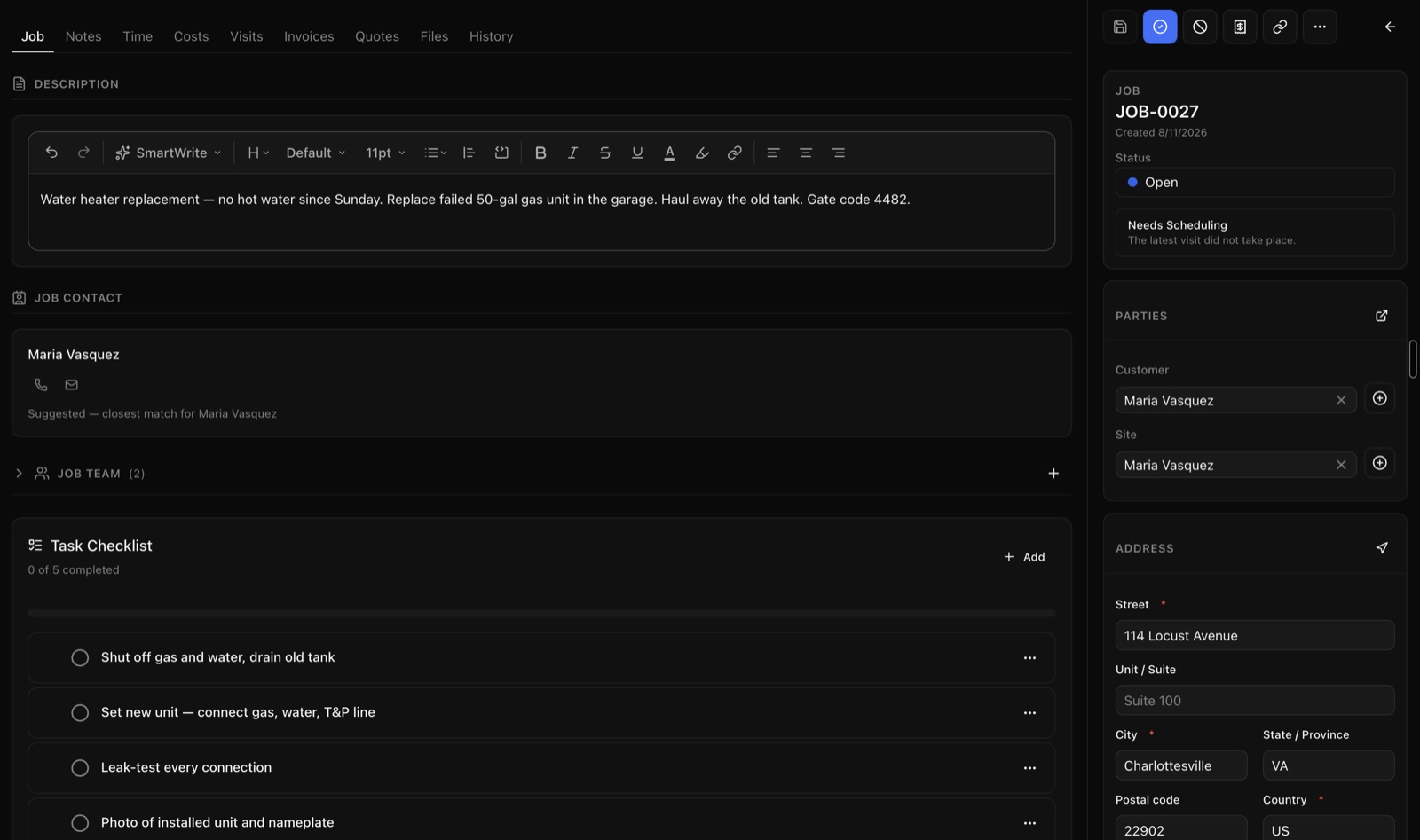
One job, one screen
What to do, who to call, the gate code and the checklist — with nothing filed three clicks away.
Books that add up
Invoices, payments and taxes download in the format your bookkeeper imports — QuickBooks Online, Desktop, or a plain spreadsheet.
14 days free
Full Professional plan. No credit card to start.
$0 setup
No setup fee. No annual contract. Month to month.
Any trade
Nothing is hard-wired to one industry. Set it up your way.
Your own Stripe
Card money lands in your account, on your schedule.
Works with
It plugs into the tools you already pay for.
QuickBooks Online
Download invoices, payments and taxes as a file your bookkeeper imports.
QuickBooks Desktop
The same figures in the IIF file Desktop expects.
Stripe
Card payments online and in the field, paid into your own account.
Tap to Pay
Contactless cards on iPhone and Android — no extra hardware.
Apple & Google Maps
One tap from the job to turn-by-turn directions.
Email & text
Quotes, invoices, reminders and on-the-way messages.
Your own Stripe account
Payouts land in your account on your schedule. We're not in the middle of it.
Spreadsheets in and out
Bring your customer list and prices in from whatever you run now, and download them back out whenever.
The job isn't done when the truck pulls away. It's done when the paperwork is.
Hours, notes, costs and the signature come back with the tech — or the visit doesn't close. No Sunday night chasing five people for what happened on Thursday.
Pricing
Priced so a two-truck shop can afford it.
Every plan includes the whole job — scheduling, quotes, invoices, payments and the mobile app. Bigger plans add the back-office pieces you grow into.
Starter
For solo operators getting started
$49/month
Includes 2 users
Start free trial- Jobs, scheduling & calendar
- Quotes & invoicing
- Card payments & deposits
- Customer management & portal
- Job templates & checklists
- Automated reminders & late fees
- Mobile app for iPhone & Android
2 users included · $29 per extra user
Professional
For small teams ready to scale
$149/month
Includes 5 users
Start free trial- Everything in Starter
- Time tracking & timesheets
- Clock in/out on site & overtime
- Recurring jobs
- Quote versions & signatures
- Equipment & asset history
- QuickBooks & spreadsheet export
- Your branding on PDFs
- Tap to Pay
- Activity & audit logs
5 users included · $29 per extra user
Business
For established operations
$299/month
Includes 10 users
Start free trial- Everything in Professional
- Inventory management
- Purchase orders
- Reports you build
- Two-way text conversations
10 users included · $29 per extra user
Prices in USD, billed monthly. Extra users are $29 a month on every plan. See what each plan includes.
Trust
The boring parts, done properly.
We never see card numbers
Payments run through Stripe on your own account. Card details never touch our servers.
Sign in the safe way
Everyone gets their own login. Add a second step at sign-in — a code on their phone — whenever you want it.
Your work stays yours
Your customers, prices and jobs are walled off from every other company using ZippCrew. Nobody else can see them.
Everything is logged
Who changed the price, who moved the job, who opened the file — with a timestamp.
Questions
Straight answers.
What happens after the free trial?
You get 14 days on the Professional plan with no credit card. When it ends, pick a plan and keep everything you entered — or walk away and take your customers, products, invoices and payments with you as a spreadsheet.
What does the built-in assistant actually do?
You ask for something the way you'd say it out loud, and it does it in your account — books the job, builds the quote off your own price list, pulls up what you charged this customer last time, tells you who's free Thursday, or lists who's overdue. It's on every plan, typed. Talking to it out loud starts on Professional.
Can I stop techs closing a job with half the paperwork missing?
Yes, and that's the point. You pick what a visit needs before it can be called done — hours, a note about what was done, a look at the parts and costs, a signature. Miss one and it won't close. You can soften any step to a reminder instead, or let a manager wave one through with a reason on the record.
Am I locked into a contract?
No. It's month to month, cancel whenever. There's no setup fee and nothing to pay to get started.
What counts as a user?
Anyone who signs in — office staff and techs alike. Starter includes 2, Professional 5, Business 10. Extra seats are $29 a month each on any plan.
Will it work for my trade?
Yes. Picking your trade at signup only changes the starting suggestions — job types, checklists, labels. All of it is ordinary information you can rename, add to, or delete.
Can my techs use it without signal?
Only in a limited way today. Select field actions can wait to send, but uncached job details, photos and checklists still need a connection. Broader offline support is in development.
How do I get my existing customers in?
Bring them in from a spreadsheet — customers, addresses and your price list. If you're leaving another program, download your list from there and hand us the file.
Every job, handled.
Start free today. Have your first job on the board in ten minutes.